Home › Technologies › Xtract
Technology · Accounts payable

Every supplier invoice, recorded in your ERP with no manual keying
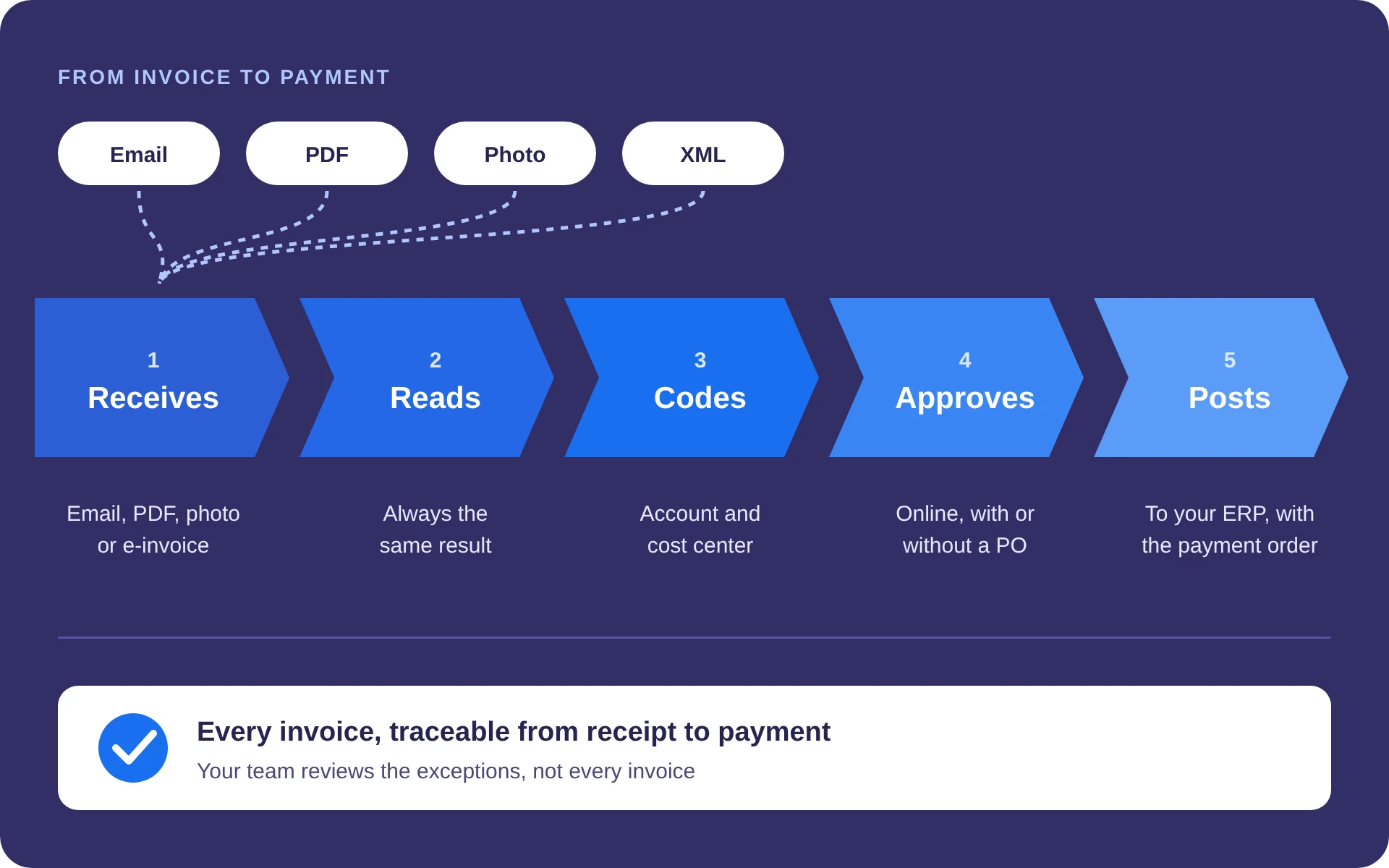
Xtract receives each invoice in whatever format it arrives, always reads it with the same result, assigns the accounting, sends it for approval and records it in your ERP with the payment order. Without changing your ERP.

The hidden costs of duplicate payments
An invoice that comes in twice gets paid twice
Duplicate payments didn't disappear with the ERP or with electronic invoicing. They almost always start with a human error at entry: the same invoice arrives or is sent for approval twice, and nobody notices.
1.5%
of payments are duplicated at the median organization, according to APQC.
0.8%
at top-performing organizations: not even the best reach zero.
45 to 90 days
to recover a duplicate payment, when it can be recovered at all.
The inbox someone has to dig through
All the electronic invoices land in the same mailbox. Someone has to find them by hand and forward them for approval: it's easy to send the same one twice, or the PDF and the XML separately.
The invoice that comes every month
Contracts and recurring services: same supplier, same amount, every month. The approver saw one copy on Monday and the other on Thursday; with so much volume, they don't remember it's the same one and approve it again.
The urgent-payment shortcut
The regular channel is slow, the supplier complains and a manager pushes the invoice through as an urgent payment, signed by a senior executive. Because it doesn't come in tied to the purchase order, neither the people nor the system see that it was already recorded.
These are human errors, not bad faith. When a single tool controls the whole flow, from the moment the invoice arrives and through all its approvals until it lands in the ERP's accounts payable, there is no second path for the same invoice to come back in. That is what Xtract does.
Figures from APQC and from the sources gathered in the 2026 update of EXYGE's article “The hidden costs of duplicate payments.”
Why Xtract
Deterministic reading, not an AI that guesses
Generic AI tools need prompts and human validation, and they charge per query; in an amount or a withholding, an invented figure is expensive. Xtract uses language models, but it doesn't depend on them.
Always the same result
The same invoice always gives the same result: no prompts to write and no invented amounts.
Traceable
Each invoice is tracked in real time, from arrival to payment.
Your data doesn't go to third parties
Invoices are not sent to other vendors' AI services.
Predictable cost
A fixed cost based on volume, not per query.
Three products, one platform
Automatic booking
Reading, journal entry and recording in the ERP.
Invoice approval
100% online approvals, with or without a purchase order, with reminders.
Travel expenses and advances
Expense reports and travel advances from an app.


Works with the ERP you already have
The finance back office the ERP doesn't cover
Xtract integrates via API or flat file with more than 50 ERPs: SAP · Oracle · NetSuite · Microsoft Dynamics 365 · Odoo · Sage · Acumatica · IFS · Totvs · Siigo · Softland · QuickBooks · Xero · Zoho Books, among others. According to Xtract, implementation takes 5 business days and requires no custom development.
Xtract works on its own. If you want to cover finance operations end to end, at EXYGE we can optionally combine it with DaMap, which reconciles what was invoiced against what reaches the bank, and with Cflow, for the workflows that fall outside the ERP.
Who uses Xtract
More than 300 companies in more than 20 countries
Among them Arcos Dorados, YPF, Pomelo, InvGate, MODO, SanCor Salud, Deloitte, Flybondi, Supermercados DIA, Brinks, Subway and Naranja X.
MODO
Latin American fintech, on SAP
More than 9,300 invoices processed and more than 1,240 hours of manual work avoided: about 53 hours a month.
SanCor Salud
Health group in Argentina, on SAP S/4HANA
More than 26,000 invoices processed and 3,467 hours avoided: about 200 hours a month.
Source: Xtract website (xtract.app). The references and figures are Xtract's, not EXYGE's.
What do we use it for at EXYGE?
The problems it solves in your operation
Invoices that arrive by email, as PDFs, scans or photos, and someone keys them in by hand.
Approvals that get lost in email, with or without a purchase order, and payments that are delayed.
Keying errors, duplicate invoices and double payments to suppliers.
Travel expenses, advances and expense reports managed in spreadsheets.
How do we implement it?
Up and running in a few days
01
We connect the inbound channel
Invoices are forwarded from Gmail or Outlook to a single platform.
02
We define the rules
Accounts, cost centers and approval routes, with your team and according to your policies.
03
We integrate with your ERP
Via API or flat file, with the ERP you already have; no custom development.
04
We stay with you until it's automated
Real-time tracking per invoice, custom reports and support until the cycle runs on its own.
In which solutions?
Where does Xtract come in?
Finance operations and shared services
Accounts payable with no manual keying in the shared services center, with every invoice traceable to payment.
Modern controllership, risk and compliance
Lower risk of duplicate payments and approvals with evidence, ready for audit.
Cost and profitability
Each invoice reaches the ERP with its account and cost center, so you know what is spent and where.
Is your team still keying in invoices?
Let's talk for 30 minutes about your accounts payable cycle.

